From Prompt to Final Post: Full Social Clip Creation on CapCut PC With AI Storyboard

Table of Contents

Introduction
The development of a short video seems to be easy, yet amateurs can experience a slow and unstructured process. Ideas, scripts, scene planning and editing to come up with a final post take time. The reason a lot of creators quit halfway is that the creative process is too cumbersome and difficult to understand.
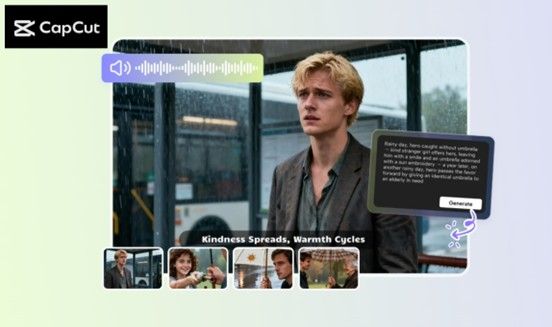
CapCut Desktop Video Editor provides an easy start-to-finish application which assists the user in going through script-to-final export in a single place.
AI Writer and AI Storyboard will help you get a video plan with a less complicated idea, and less pressure and stress. It is important to note that CapCut Desktop Video Editor is not a completely free application, and certain AI functions can be paid.
The Way CapCut Desktop Enables You to Create Prompt -> Script -> Storyboard -> Final Clip
#1 - Why Use AI for Social Clips?
Videos are quick, and content makers are trying to post regularly to be noticed. Such a hurry may cause stress when the thoughts are so dispersed and difficult to get into a concise plan. It can have a smooth flow: the idea followed by the script, followed by the shot plan and finally the export.
Current AI tools assist in this flow by reducing the time-consuming tasks, which are performed daily. CapCut PC integrates automation and creativity with features such as AI Writer and storyboard planning under a single roof.
The tools take an individual through the thinking process to the output process with minimal effort. You can refer to the links later to learn how every feature works.
#2 - Fast Script Generator Artificial Intelligence Writer
AI Writer transforms a small thought into a script containing voice lines and captions, and hooks that fit the style of a short video. It saves time and cleans the mind when ideas are no longer flowing.
The tool can be utilized by UGC makers, educators, brands, and all users who produce lots of clips during a week. The user types a short prompt, selects a tone and receives a script that they can record. To discover all the features of the feature, you can visit: AI Writer.
A paid upgrade might be required for some of the long-form or advanced outputs. Once the script is prepared, one can plan the scenes visually with the help of the AI Storyboard tool.
#3 - Artificial Intelligence Storyboard: Converting Script to Shot Ready Frames
After setting the script, it may become a visual guide using AI Storyboard, which develops blocks of the scene outside of the text. The storyboard displays the sequence of shots, gives you an idea of how to pace your film, as well as enables you to strategize sound, angles, and screen space.
This comes in handy with TikTok, Reels and Shorts where timing is of the essence. You can find out more there: AI Storyboard. The device generates video animations, rather than portrait pictures.
CapCut Desktop Video Editor is also available in 1,000+ avatar styles, 150 voice tracks, and is a desktop video editor. Have your plan to hand, now you can construct your entire clip in the editor, bit by bit.
How To Make A Social Clip Between Prompt and Final Post
Step #1 - Download and Install CapCut Desktop Video Editor
To begin with, go to the official CapCut site and download CapCut Desktop Video Editor to the PC. Choose the desktop version as opposed to the mobile application.
Installation is only followed by opening the software and signing in, such that all features are accessible. Certain AI solutions can provide upgrade warnings on those which are in the category of paid access, though the basic installation is operational.

Step #2 - Create Your Script With AI Writer
Download and open CapCut Desktop Video Editor, and in the upper bar, click on Tools. Click AI Video Maker, then on Brainstorm with AI, and open the script window. Enter your subject, choose a tone or a voice, and just click Generate. A script draft will be shown depending on your prompt.
Customize the text, add or modify scene notes, or form the CTA to your end. This action will help to save time and make the message understandable. There could be some extended outputs that need a premium upgrade based on length or style.

Step #3 - Develop a Script to Visualise with an AI Storyboard
Once you choose “Use” for the AI-generated script, move to the “Scenes” tab to assign the corresponding audio and visual elements. The customization begins with the voiceover. Select from multiple AI voices and fine-tune the tone, speed, and emotional style to match the mood of your content. You can record the scripted voiceover for each segment individually or enable “Auto Split Script” to divide longer scripts into manageable sections automatically, ensuring smooth pacing and better viewer retention. For this guide, simply select “Apply to All Scenes” to proceed.

Step #4 - Edit, upgrade and export Final Clip
With your YouTube script and media in place, you can move on to additional enhancement options like Elements and Music. Under Elements, you can add well-designed captions that boost both the clarity and accessibility of your video. In the Music tab, you can browse and apply copyright-free audio tracks to elevate the overall production quality.

Preview the final look of your YouTube video and make sure that you're happy with it. If you are happy with the preliminary results that you have achieved so far, then you can go ahead and click on Export. On the other hand, if you need to make that last-minute adjustment, then click on "Edit more".

Conclusion
CapCut Desktop Video Editor is simpler to use in creating short video. You can begin with a subject, create a script with AI Writer and convert it to a well-defined storyboard with AI Storyboard. This assists in arranging shots, time and captions in a hurry.
Then edit, put music, and export the finished clip as it is ready to post. CapCut Desktop Video Editor is a tool that processes the entire workflow, but certain aspects of AI might be paid. Test it now, write a prompt, plot, edit, and publish.




