


Part of our Logical Functions in Excel guide
ISNUMBER Function in Excel
ISNUMBER function in excel is an information function that checks if the referred cell value is numeric or non-numeric. Its output is a boolean value (“True,” if the “value” parameter is numeric or “False” if the “value” parameter is non-numeric)
Syntax
The ISNUMBER formula is stated as follows:
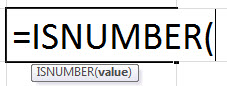
The ISNUMBER formula has only one parameter, the “value.”
- Value: It is a flexible parameter. It can be another function or formula, a cell, or value that needs testing if it is numeric or not.
The ISNUMBER formula returns the following logical values:
- “True,” if the “value” parameter is numeric.
- “False,” if the “value” parameter is non-numeric.
The formula is represented in the following format.
“=ISNUMBER(Reference Cell)”
The argument “reference cell” refers to the cell which we want to check or identify.
Let us consider the following ISNUMBER formula.
“=ISNUMBER(T1XT)”
The output is “false,” as the argument T1XT does not have numbers in it.
- The ISNUMBER function is an information function used to find if the cell value in reference is a numerical value or not. It returns values as “true” or “false.”
- The formula for the ISNUMBER function is “=ISNUMBER (value).”
- It is a worksheet (WS) function in Excel.
- • It is a Boolean function of Excel which gives the output as “true” or “false.”
- The ISNUMBER function along with the Excel SEARCH function, checks if a cell contains a specific text among the content of the cell.
Characteristics of ISNUMBER Function
- It returns a Boolean value (“true” or “false”).
- It finds its usage as a worksheet (WS) function.
- It is a part of IS functions group of Excel.
ISNUMBER in Excel – Video Explanation

How to Use the ISNUMBER Function in Excel?
Let us understand the uses of this function with few examples of actual data.
Let us enter a few values given in the table below and test the behavior of the ISNUMBER function.

How to use Excel ISNUMBER Function and the SEARCH Function?
→ Explore all 42 Text Functions in Excel articles
The ISNUMBER function, together with the SEARCH function, checks if a cell contains a specific sub-string among the text string.
SEARCH function in Excel will return the position (or index) of a specified substring within a text string. It belongs to the Excel TEXT functions category. It allows running a case-insensitive search on text and supports the usage of wild cards.
We will understand how the ISNUMBER function works together with the SEARCH function in the following example.
Let us use other functions (e.g., SEARCH function) as parameters for the ISNUMBER function and test its behavior (as shown in the table below).
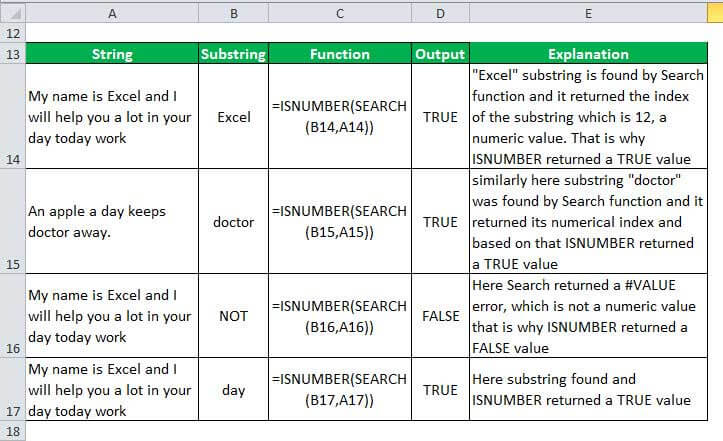
Consider the ISNUMBER formula mentioned in the table,
“=ISNUMBER(SEARCH(B14,A14))”
Now, we will observe how this formula works,
- At first, the SEARCH function looks for the substring “Excel” (B14) in the specified cell (A14). It returns the position of the substring as 12. If the substring is not found, it returns an error value (#VALUE).
- Then, the ISNUMBER function checks whether the SEARCH function returns a numeric value; if yes, the output is “true.” If the SEARCH shows an error value (non-numeric), then ISNUMBER returns “false.”
Frequently Asked Questions (FAQs)
What is the Excel ISNUMBER function?
The ISNUMBER function checks if a cell contains a number or not. It returns “true” if the value is numeric, and if not, it returns a “false.”
How to use ISNUMBER in Excel?
We use the ISNUMBER function to test if a value is a number. It will return “true” when the value is numeric and “false” when non-numeric.
Let us consider the syntax “=ISNUMBER(G1).” It returns “true” if the argument “G1” contains a number or a formula that returns a numeric value. It returns “false” if the argument “G1” contains the text.
How do ISNUMBER and ISTEXT functions differ?
The ISNUMBER function helps to check whether a value in a cell or a value resulting from another formula is a number. The output of ISNUMBER is either “true” or “false.”
The ISTEXT function checks whether a value is a text or not. The result of this function is also either “true” or “false.” Moreover, using this function, you can find if a value in a cell is a numeric value entered as text.
Recommended Articles
This is a guide to the ISNUMBER function in Excel. In this article, we have discussed how to use this function along with step-by-step examples and a downloadable template. You may also look at the below useful functions in Excel –