

Introduction
An ATS-friendly financial analyst resume template can significantly enhance your chances of passing applicant tracking systems and securing interviews for highly competitive finance roles. Picture this: you polish every bullet on your résumé, click Apply, and wait—only to hear silence. Almost 69 percent of résumés vanish inside an ATS filter before a human ever looks at them, and 98 percent of Fortune 500 companies now rely on those bots. Finance roles feel the squeeze most, with hundreds of applicants per opening.
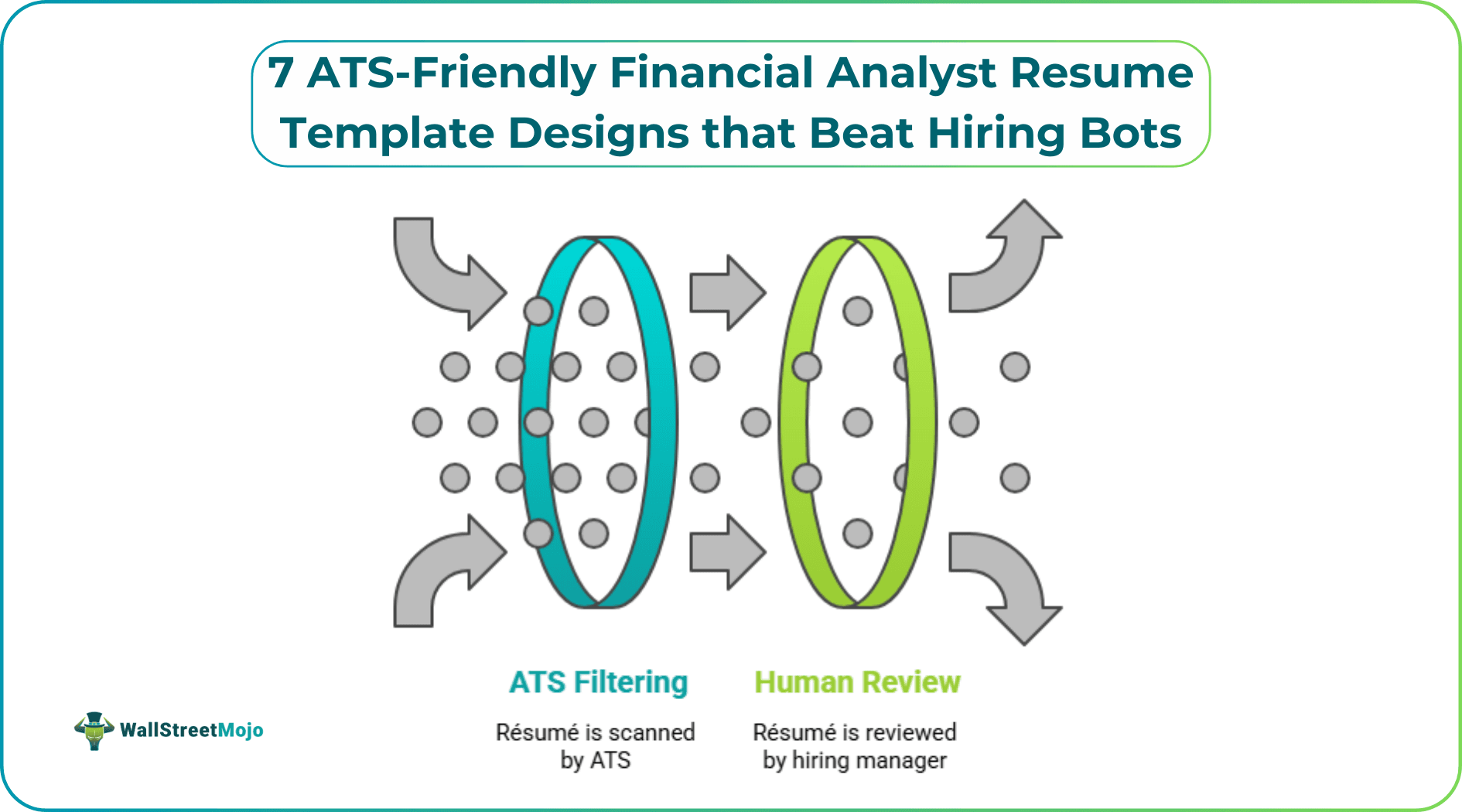
We’re here to flip that script. In this guide, you’ll see exactly what makes a résumé ATS-friendly and discover seven proven templates that glide past the scanner and land on a hiring manager’s screen.
Selecting the right ATS-friendly financial analyst resume template is the first step toward creating a resume that hiring managers as well as applicant tracking systems can read easily.
Understanding ATS in Finance
An applicant-tracking system (ATS) is an ultra-literal reader. It strips your résumé to plain text and checks for exact matches on job titles, skills, and certifications. Anything it cannot interpret disappears; tables cause trouble, icons show as blanks, and a header hidden in a text box can scramble the order.
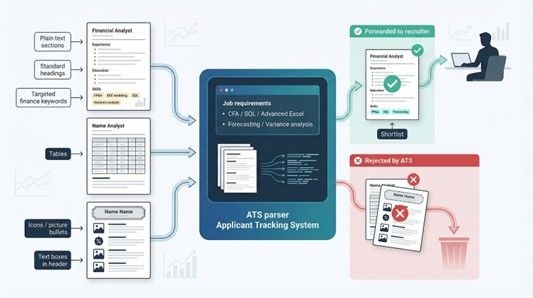
Finance raises the stakes. A single analyst role can attract hundreds of applicants, so recruiters tighten the filters. The software looks first for hard credentials (CFA status, SQL skill, advanced Excel) and then for terms like “forecasting” or “variance analysis.” Miss or mislabel those words and the ATS quietly rejects your file, no matter how strong your models are.
You must write for two audiences at once: the algorithm that scores keyword relevance and the human who skims for metric-backed wins. Meet both needs and your résumé jumps from digital stack to interview list.
What Makes a Résumé ATS-Friendly
An ATS rewards structure, not style. Give it clean, labeled text and you score higher. Feed it graphics and critical details disappear.
Five levers matter most:
- Keywords. Mirror the job post. If the ad says “FP&A,” write “financial planning and analysis (FP&A)” once, then repeat “FP&A” in your bullets.
- Section labels. Stick to the classics: Experience, Education, and Skills. Creative headings confuse parsers.
- File type. Most systems read PDF or DOCX. Never upload a scanned image; when unsure, choose Word.
- Layout. One column is safest. Two columns work only when the template reads the left side first, then the right.
- Numbers. Metrics boost human credibility and supply keywords in context, helping many scoring algorithms.
Keep these rules handy with the quick check below.
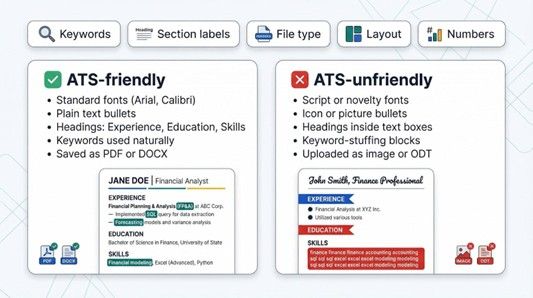
| ✅ ATS-friendly | ❌ ATS-unfriendly |
|---|---|
| Standard fonts like Arial | Script or novelty fonts |
| Plain text bullets | Icons or picture bullets |
| Headings: “Experience” | Headings inside text boxes |
| Keywords used naturally | Keyword-stuffing blocks |
| Saved as PDF or DOCX | Uploaded as image or ODT |
Follow the left column and your résumé clears the robot test every time. Ignore the list and even the sharpest results sink without a trace.
7 ATS-Friendly Financial Analyst Résumé Template Designs
The accompanying guide includes a 15-item skills checklist covering essentials like financial modeling, GAAP, and risk management that you can drop straight into your Skills section to satisfy even the strictest ATS filters.
#1 – Novorésumé’s modern financial analyst sample
The quickest way to combine style with scanner-proof coding is to start with Novorésumé’s financial analyst résumé example.
At first glance, the layout feels sleek: wide margins, generous white space, and a muted accent color frame each header. Under the hood, it is pure linear text. No tables. No hidden text boxes. Every section label (Experience, Education, Skills) sits exactly where an ATS expects it, so parsing engines lift your keywords in the correct order and hand recruiters a résumé that already looks polished.
Novorésumé also nudges you to front-load achievements. A summary block sits just below your name, inviting a two-line pitch packed with finance terms such as “FP&A,” “DCF modeling,” and “Excel VBA.” Farther down, a dedicated Skills grid repeats those words in plain text, reinforcing the match score without keyword stuffing.
The document ends up elegant for a hiring manager and simple for even the oldest HR software. If you’re looking for an ATS-friendly financial analyst resume template, Novorésumé’s financial analyst sample is an excellent place to start.
#2 – Enhancv’s balanced layout
If Novorésumé is the minimalist banker’s suit, Enhancv feels like a sharply cut blazer with a pocket square. The builder lets you add a splash of color or a narrow sidebar, yet every element remains machine readable.
Enhancv two-column financial analyst resume layout screenshot
Enhancv structures its two-column design as one logical flow, so an ATS scans the left column first, then moves down the right, which mirrors the recruiter’s view. Icons appear only beside live text, and contact details, job titles, and dates never hide inside graphics.
The tool invites a Key projects section. For analysts, that space is gold: you can highlight a discounted-cash-flow model that drove a USD 20 million acquisition or a Power BI dashboard that cut reporting time by 40 percent.
Choose a muted palette, keep fonts standard, and this template achieves modern flair on the surface and strict compliance in the code.
#3 – The classic single-column format
Sometimes the safest move is the simplest: one clean column that flows from header to final period. Recruiters know this look. Legacy ATS platforms appreciate it.
This makes a single-column ATS-friendly financial analyst resume template an excellent choice for when applying for roles that attract high competition.
Open with a professional summary—two direct lines that state your numbers-driven focus. Below that, work history lists roles in reverse-chronological order. Each bullet starts with a verb, ends with a metric, and slips in a keyword: “modeled a three-scenario cash-flow forecast that cut variance by 12 percent.”
Education and certifications follow, then a concise Skills list. Because there is no sidebar, nothing risks being read out of sequence. If you saved the document as plain text right now, the order would stay perfect.
The format may look traditional, but in conservative banking circles a familiar layout signals professionalism, not boredom. Add navy headings and a modern font like Calibri for understated polish that travels through every corporate firewall.
#4 – Two-column hybrid done right
Space is limited when you need to fit five years of modeling, a CFA Level II pass, and a Python side project on one page. A well-built two-column layout solves that puzzle without confusing the bots.
Picture a narrow sidebar on the left that holds contact info, key skills, and certifications—quick facts a recruiter can scan in three seconds. The wider right column carries your story: summary, experience, and education stacked in reading order.
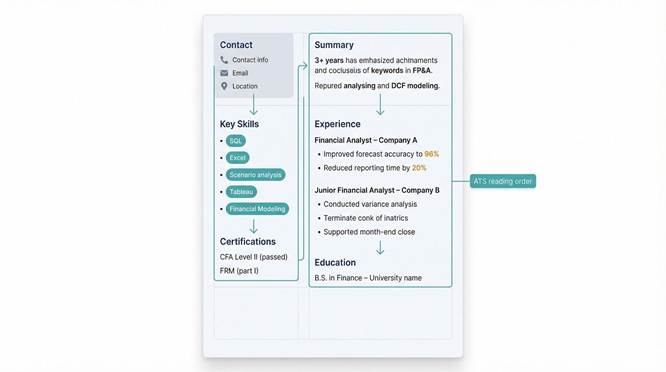
The behind-the-scenes trick is a table, so the ATS reads cell A top to bottom, then jumps to cell B. No zigzag lines. No mashed-up sentences.
When you build this format in Word, test it. Save as plain text. If the skills list appears first, followed by full sentences from your experience section, you are set. If lines interleave like a flawed spreadsheet import, rethink the layout.
Use the sidebar to spotlight high-impact keywords—“SQL, Tableau, Scenario analysis”—then echo each term in a result-based bullet. This deliberate repetition lifts the relevance score and keeps the human reader anchored.
#5 – Keyword-rich “Skills + summary” layout
ATS algorithms award points for every required term they find, so serve them a buffet in the first quarter of page one.
Ideally, an ATS-friendly financial analyst resume template should have a prominent summary and skills section. This section should include the keywords recruiters as well as applicant tracking systems expect to find.
Start with a two-line headline summary that mirrors the job ad. If the posting says “financial planning and analysis,” write that phrase, then weave in “variance analysis” or “M&A modeling” where relevant.
Directly beneath, add a Core skills block—six to eight items separated by vertical bars or bullets. Keep everything in plain text. No rating bars. No icons. Examples: “SQL | Power BI | DCF | ROI tracking.”
Finish with experience bullets that place those same terms in context. The scanner tallies matches, the recruiter sees proof, and you move to the yes pile.
#6 – Metrics-focused bullet technique
Robots scan for keywords, but people hire on proof. That proof shows up as numbers.
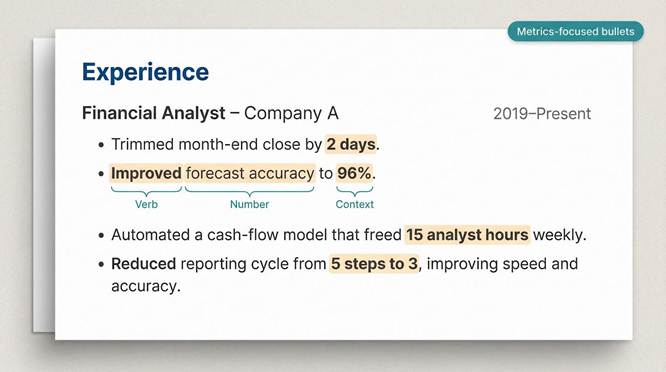
An ATS-friendly financial analyst resume template should highlight quantified achievements, as applicant tracking systems and recruiters value measurable results.
Every experience bullet starts with a measurable win.
Trimmed month-end close by 2 days.
Improved forecast accuracy to 96 percent.
Automated a cash-flow model that freed 15 analyst hours weekly.
Notice the structure: verb first, number second, context last. The verb draws attention, the value quantifies impact, and the keyword (“forecast,” “cash-flow”) keeps the ATS happy.
Bold the actual figure—just the 96 percent or the USD 12 million. Recruiters skimming on mobile catch the wins instantly, yet the formatting does not trip parsing software because the text stays live.
When proprietary dollar amounts are off-limits, use ratios or time saved. Reducing a process from five steps to three still counts as quantified value. Tie every task to an outcome the CFO cares about and a robot can read.
#7 – The role-specific master template
Your résumé is not a billboard; it is a chameleon.
An ATS-friendly financial analyst resume template works best when you customize it for every job application instead of using the same resume for every employer.
Keep one master file that lists every project, certification, and side gig you value. Before each application, duplicate the file, remove items the posting does not request, and rewrite a few bullets so the language mirrors the ad. Ten minutes of editing can double your ATS match score and make the remaining content feel laser-focused.
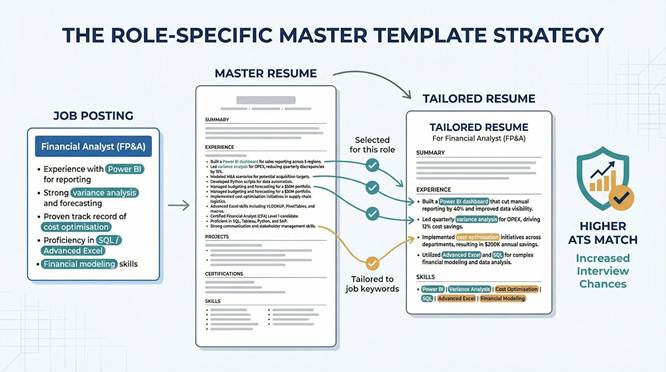
If the role highlights “Power BI,” move that skill into the Skills list and add a bullet such as “built a Power BI dashboard that cut manual reporting hours by 40 percent.” If another company stresses “cost optimisation,” spotlight your variance analysis win instead.
Strategic pruning removes noise, elevates relevance, and guides both the algorithm and the recruiter toward the exact reasons you deserve an interview.
Last-Minute Optimization Tips and Closing
Even the best ATS-friendly financial analyst resume template requires proper customization to match the job description and maximize ATS compatibility.
Before you hit upload, run one final quality check.
- First, open your résumé as plain text. If every section still reads in order and no characters look scrambled, the ATS will parse it just as cleanly.
- Next, confirm the file type. Unless the portal specifies Word, export to PDF. Modern systems read PDF without issues, and your careful formatting stays intact.
- Finally, skim for noise. Extra adjectives, dated coursework, or hobby fluff only dilute your match score. Trim, tighten, and keep the spotlight on quantified results and targeted keywords.
An ATS-friendly financial analyst resume template is only effective when paired with relevant keywords, measurable achievements, and a clean, ATS-compatible layout. Treat your résumé as a data set the bots recognize as a perfect fit and a story hiring managers want to discuss in person.
Good luck. We hope to see you in the interview room.
Recommended Articles
For more on CPA Exam, explore these related articles from our CPA Exam guide.