


What Is An Opt-In Form?
Opt-In Form is a consent form presented to internet users browsing websites and visiting different online platforms showing sincere interest in products and services and sharing their details to let third parties contact them for further information and processes. It generally refers to email communication.
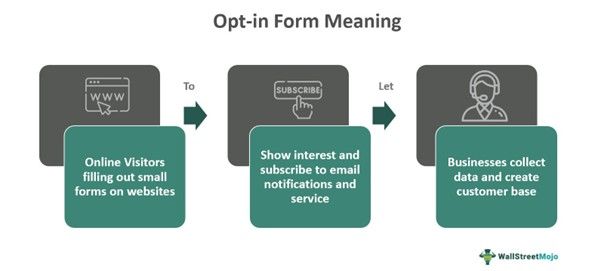
Opt-in Forms are used by e-commerce websites, news platforms, brands and service providers
to collect data with permission so that any new form of content, such as newsletters, press releases, sales, discounts, offers and other marketing and promotional content, can be shared with them. It is a common way of digital marketing and attracting potential customers.
Key Takeaways
- An opt-in form is a form of consent asking web users and visitors to share their information by showing interest in the product and services.
- E-commerce websites and online platforms use it to share newsletters, blogs, guides, marketing and promotional content over email communications.
- Offering the opt-in forms is not just good marketing and business manners but a law. The US Federal Trade Commission established the CAN-SPAM Act of 2003.
- Visitors and users can and have the right to unsubscribe to websites if they do not feel the content is relevant.
Opt-In Form Explained
Opt-in forms are subscription processes through which a web user or a random visitor to a website registers with the website’s database, sharing basic information such as name, interests, contact details and, most importantly, email address. By doing so, the visitor is also acknowledging the content of the website, allowing them to send different forms of content through email communication. However, businesses use it for marketing and promotion. There is a CAN-SPAM Act of 2003 established by the FTC, which dictates a set of rules for commercial email, gives the right to the recipient to stop it and spells out penalties and violations. The CAN-SPAM Act and rule covers all types of commercial messages and makes no exception.
Companies, websites and online platforms use opt-in forms to collect information and data of potential customers showing interest in their products, services, articles, news and different types of content. Once they successfully fill out the opt-in form. The website starts sharing content such as newsletters, digital magazines, sales, discounts, seasonal offers, catalogs, news, industry updates, product sales, reports and other relevant information.
Opt-in forms are presented to the visitors in different ways, such as pop-ups on homepages, product pages, dedicated landing pages, small dialogue boxes and even through built-in widgets in e-commerce websites. There is no set format for it, and a variety of opt-in form samples can be found online. On the contrary, brands and businesses think out of the box and bring creativity in presenting these forms to their online visitors but must comply with the laws.
Examples
Below are two examples of opt-in forms –
Example #1
Suppose John opens an e-commerce website, especially for books. From novels to educational and academic books, magazines and newspapers are sold by him on his website. He is, of course, operating as a third party. Although he keeps on checking through various tools and extensions the daily traffic on his website, which is reasonably good, he is unable to communicate with them, connect with them, inform them about new offers, sales, and discounts or make them a repetitive customer who buys John’s annual or monthly plan with other perks. Upon research, he finds that his website lacks an opt-in form.
He reads about it, selects an opt-in form template and places a small pop up dialogue box at every page of his website, asking people to just subscribe by filling out their favorite genre and email address. In just nine days, he had many web users’ email addresses. John started sending them newsletters, informing them about festival sales and seasonal discounts, and more importantly, he chose a personal touch and started sending new information, book launches and availability of an individual’s favorite genre. John was able to convert many of those web users into subscribed customers. It is a simple example of an opt-in form.
Example #2
Suppose Anthony has got his first job and is planning to start investing. Since he doesn’t know anything about the stock market, Anthony does a random search. He comes across a website that offers a variety of stock market and finance management courses. The website presents a simple opt-in form asking Anthony to share his email addresses. Once he subscribed to it, the website started sending Anthony multiple emails with newsletters, market updates, sales and discount offers.
Anthony enjoys reading the content and soon comes across an email from the website that there is a limited-time offer on a financial discipline course. Anthony believes that this is the best offer he can get and immediately buys the course. It is a simple example of how opt-in form helps businesses collect data and reach out to their potential customers at the same time and how visitors benefit from it.
Importance
Importance of opt-in-form are –
- Help companies and firms collect data from their website visitors and general internet users with permission.
- From a web user’s perspective, it allows them to connect with the right websites, platforms and e-commerce companies.
- With all the data collected, the websites or companies can create a customer base and attract them.
- It allows companies and websites to share their marketing material and promotional content with people over email.
- Assists in developing a digital relationship and brand value with the people who fill out the opt-in forms.
- Content such as newsletters, marketing emails and other content inform web users about new launches, blogs, discounts and special offers.
Best Practices
The best practices regarding opt-in forms are –
- Keep it short, people usually do not like to share crucial details and spend much time filling out lengthy forms.
- Websites should never hide their opt-in form on any of their web pages.
- Online platforms and e-commerce websites should offer a concrete reason for visitors to fill out the opt-in form.
- Companies should practice relevance and inform web users what to expect from them after they fill out the opt-in form.
- It should never be a link but a form, as most of the time, visitors get discouraged when asked to click a link.
- Since there are no set formats or standard templates to follow, businesses should strive to be as creative as possible with their opt-in forms.
- Do not use corporate jargon and terminologies. Try using new words for subscriptions, newsletters and updates.
- Keep the unsubscribe link close on the opt-in form, through this simple step, websites can actually make the user feel easy about unsubscribing.
- Make good content and have value on the website. It automatically makes people subscribe, wanting more information.
Frequently Asked Questions (FAQs)
Frequently Asked Questions
Where and when should you display your opt-in forms?
Opt-in forms are useful but essentially depend on their display time and placement on the websites. In general practice, it is believed that opt-in forms are placed at the bottom of blog posts just when people have finished reading the articles. Most websites place it before giving access to the page. It creates urgency among web users to give in detail to access the page and, at the same time, can discourage them, and they can leave the website.
Why use a double opt-in form?
Double opt-in is the process where when one visitor fills in the form giving out their email address, a confirmation email is sent to that email to validate the contact information. Once it becomes authenticated, the main reasons to use a double opt-in form are filtering out fake email addresses, better engagement, compliance with rules and regulations and improved deliverability.
What are the types of opt-in forms?
There are multiple types of opt-in forms, such as – 1. Pop-up forms – small windows appearing at the top of the webpage content 2. Exit intent form – Strategically placed for visitors to detect when they are about to leave 3. Sidebar form – Usually found on the sides, common with blogging pages and websites with heavy content. 4. In-line form – Integrated directly to the website’s content 5. Slide in form – Placed in the corner or edge of the website page, creating less disturbance 6. Sticky form – Remain fixed and are always visible even when the web page is scrolled. 7. Full screen or modal form – This covers the entire screen and prompts the user to share an email address.