
What Is Document Security?
Document security refers to the undertaking of various measures to discourage unauthorized access to sensitive information for manipulation, misuse, or breach. It is vital for preserving the confidentiality, integrity, privacy, and safety of PDFs and other files available with a company for internal or external use.
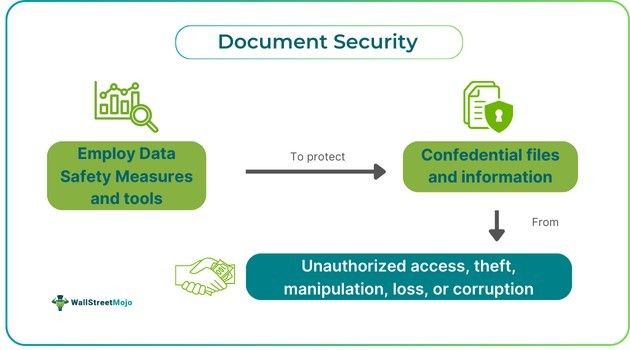
The digital era has made firms more reliant upon information, emphasizing the need for top-notch business data protection. Therefore, the companies undertake various security measures like password protection, restricted access, and encryption to ensure data privacy compliance, avoid document corruption, breach, manipulation, or loss, and maintain customer trust.
Key Takeaways
- Document security is a system that facilitates businesses or individuals’ protection of their files against unauthorized access, malware, corruption, manipulation, loss, theft, or other threats.
- Such measures are critical for ensuring the authenticity, availability, confidentiality, integrity, and non-repudiation of the external and internal business files.
- Some of the prominent methods of document safety include password protection, encryption, watermarking, restricted access, digital rights management, document tracking and elimination, and information rights protection.
- The companies prioritize document protection to increase their credibility, enhance customers’, stakeholders’, and employees’ trust, preserve intellectual property, and avoid data breach penalties.
Document Security Explained
Document security refers to the various tools and measures adopted by individuals or firms to refrain from the unauthorized use, corruption, loss, theft, or manipulation of confidential files. Such practices are essential since companies use, store, and share a lot of sensitive information, which is highly susceptible to data breaches, malware, or other frauds if not protected. Also, the company’s stakeholders, customers, and employees require the highest level of data safety from the businesses to ensure that their confidential details are in their safe hands.
The classification of document security can be understood through the following 5 pillars that are primarily considered for the protection of business information:
- Availability: The foremost consideration is that the documents should always be accessible in their original form by authorized users without any cyber threat or malware.
- Confidentiality: Encryption helps businesses keep confidential information private and prevent unauthorized access.
- Authentication: Document protection systems should have strong identification mechanisms to ensure that information is accessed only by the person who has the authority to access it.
- Integrity: This factor emphasizes that the documents or files have not been forged, manipulated, or modified in an unauthorized manner before their use or transfer.
- Non-repudiation: Another critical element is proof that a particular person or firm has viewed, shared, or modified a file so that they cannot deny such access later. This is possible through audit trails, digital signatures, and logging.
Types/Methods
The companies use various document security solutions to ensure that their critical information is safe from malware, theft, or loss. Some of these methods are as follows:
- Encryption: A key can protect the document or the entire drive where a particular file is stored. Only the person who has the key can access those files.
- Password Protection: This feature, usually found in Word or PDF document security settings, allows a file to be accessible only through a password.
- Watermarking: Companies or individuals can place a watermark on files that exclusively belong to them so that no one else can claim, copy, or share such documents under their brand name.
- Restricted Access: Another security feature limits access to the files to only authorized users who can modify or edit these documents, while others can only read or comment on them.
- Digital Rights Management: Another eBook or PDF document security method is using the DRM technology to restrict the download, upload, sharing, copy-pasting, or multiple device access to a particular file.
- Document Tracking and Elimination: Such a mechanism can help companies and individuals track their files, I.e., when and by whom they are downloaded, read, or printed.
- Information Rights Protection: This type of document protection allows firms to control the accessibility of their files even after transferring them to another organization, I.e., restricting their use or unauthorized access.
How To Improve?
Companies often strive to improve their document security systems; however, with the advancing technology, the risk of data breach and malware are equally rising. Nevertheless, the following are the various best practices that the business can consider:
- The firms can educate their staff on phishing emails to reduce the chances of cyberattacks.
- Firms should use a proper document management system to run on autopilot and scale the protection of their files. It should include audit trails, password protection, and other relevant methods.
- The passwords should be extended, unique, complicated, and intense. They should also not be written or saved in ordinary places.
- To ensure higher protection, the devices where the documents are stored should not be available for shared use.
- Multi-factor authentication should ensure that the files are highly protected from the discrepant.
- If a document has become obsolete or is no longer required, it should be destroyed or eliminated.
- Companies can also undertake third-party security services to ensure another level of safety.
Importance
Businesses usually store a lot of confidential data in the form of documents in their systems or physically. Hence, it is their utmost priority to keep such information shielded from cyber threats and other unauthorized practices for the following reasons:
- Curtail Document Corruption Risk: Companies need to ensure that they use the most secure cloud storage systems and hard drives to store critical information and safeguard it from malware, document hacking, or corruption.
- Strengthen Trust and Credibility: Customers provide confidential information like bank details to firms while initiating purchases or transactions, so protecting such data becomes essential for maintaining their trust in the company. Also, business partners, investors, and stakeholders demand a higher level of data security from firms.
- Avoid Data Breach Consequences: Businesses must take measures to ensure data safety since failing to do so may result in significant financial liabilities for the alleged companies.
- Preserve Intellectual Property: Various proprietary files, such as the research thesis, formula, trade secrets, design, etc., needed superior protection from theft or unauthorized use.
- Comply With Data Protection Laws: Measures like restricted access, encryption, and password protection help businesses adhere to information protection laws such as the General Data Protection Regulation (GDPR).
- Prevent Insider Threat: Also, restricted access, auditing, and control systems to sensitive files can help the firms discourage internal frauds commenced by their employees, like unauthorized modification or leakage of information.
- Keep the Business Going: Businesses should have a secured data system with proper backup, recovery, and replication mechanisms to ensure that files are never lost, even in case of system breakdown, disaster or malware.
- Protect Internal Data: Companies must keep a secure record of all their internal information, such as the details of suppliers, customers, employees, investors, and other associates, to avoid data breaches.
- Ensure Safe Collaboration: Businesses must exchange documents with external partners and teams in different regions or countries. Therefore, they require proper and strict control over the access of files while collaborating or sharing them with business associates.
Frequently Asked Questions (FAQ)
Frequently Asked Questions
How to change document security settings in PDF?
The user needs to go to the ‘Document Properties’ option on the File tab of Adobe PDF’s menu bar. They may also use ‘Ctrl+D’ to open the Document Properties directly. Now, the user must press the ‘Add Security’ button in the’ Security’ tab. From the drop-down menus of the various security options, the user can pick the security method of their choice.
How to remove document security on a PDF?
To remove the security of a PDF document, open the PDF in Acrobat, find the ‘Unlock’ tool and go to the ‘Tools’ option. Now, under the ‘Protect’ option, see the ‘Encrypt’ option, and click on ‘Remove Security.’
What are the best practices of document security?
Some of the tricks and tips for enhanced document security include: – Data encryption – Secure information through passwords – Using tailored data management software – Keeping a backup – Manage and limit access to data