


Excel VBA ByRef Function Argument
In VBA, we use ByRef when passing arguments to a procedure (Sub or Function). ByRef stands for By Reference and it allows the procedure to modify the original variable directly.
When we make custom functions and want to use the value of any variable defined earlier before the function, we use the ByRef function.
When a variable is passed ByRef, any changes made to it inside the procedure will reflect outside the procedure as well.
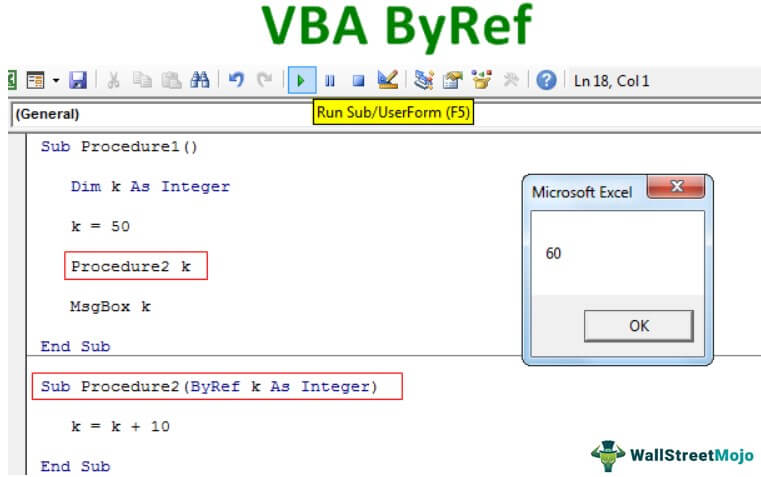
Using ByRef, we can point to the original variable value without altering the variable value. It is like passing the variable value directly to the VBA subprocedure or VBA function.
Key Takeaways
- The VBA ByRef allows a procedure to directly modify the original variable passed to it. It is very useful if the same variable is used throughout the program even outside the procedure.
- It is useful for returning multiple values from a procedure without using a return statement.
- Once the variable is passed, changes made inside the procedure affect the original data outside the procedure.
How To Pass Argument Using VBA ByRef Argument?
Example #1
Look at the VBA code below.
Code1:
Sub Procedure1()
Dim k As Integer
k = 50
Procedure2 k
MsgBox k
End Sub

In the first procedure above, we have declared the variable “k” as “Integer.”
Then we have assigned the value to this variable as 50.
After that, we added a new line i.e.
Procedure2 k
It is the second procedure’s name.
Code2:
Sub Procedure2(ByRef k As Integer)
k = k + 10
End Sub

In this second procedure, we have declared the variable within the parenthesis as String in VBA, but we have used the word “ByRef.”
ByRef k As Integer
Here we have assigned the value of the variable “k” as
k = k + 10
We will run the code step-by-step by pressing the F8 key.


Press the F8 key two more times and place a cursor on variable “k” to see its value .

Since we have assigned the value as 50, it shows the value as 50. Now, it has highlighted the line Procedure2 k, which is the second procedure name.
If we press the F8 key now, it will jump out of the current procedure and go to the second procedure.

Since we used the ByRef word, it carried the variable “k” value from the above procedure.

Press the F8 key twice.
It will go back to the previous subprocedure. If you notice, in the second procedure, we have applied the formula k = k + 10. i.e., the “k” value is 50, then adds 10 more to that, i.e., 60 in total.

Now, the code is running in the first procedure, and in this procedure, the variable “k” value is 50. But press the F8 key and see the result in a message box.

We got the result of 60 instead of the default value of 50 in this procedure.
We got 60 because, in the second procedure, we applied “ByRef, “so it carried the equation result (k = k + 10) to the current procedure.
Here, the first variable “k” value is 50, and in the second procedure, the variable “k” value is k + 10, i.e., 60, carried to the first procedure.
In the first procedure the original value of the variable “k” was 50, so By Ref has changed the original value from 50 to 60 by executing the equation k = k + 10 i.e., k = 50 +10 = 60.
Example #2
Take a look at one more example.
Code 1:
Sub P1()
Dim MyNumber As Long
MyNumber = 1
Call Change_ByRef(MyNumber)
‘ MyNumber is changed by the Change_ByRef procedure
MsgBox “My Number is now: ” & MyNumber
End Sub

Code 2:
Sub Change_ByRef(ByRef NewNumber As Long)
NewNumber = 14
End Sub

It works the same as the previous code.
Initially, the value of the variable “MyNumber” is 1. Then we call the procedure below by its name.
Call Change_ByRef(MyNumber)
In that procedure, the value of the variable is 14.
So, when it returns to the previous procedure, it will assign the new value to the variable as 14.

Thus, VBA ByRef is used to allow a procedure to modify the original value of a variable that has been passed to it. It is also useful for returning multiple outputs from a Sub without using any return values, as seen above.
Interested in learning in-depth on VBA? You can watch out for this exciting course on Basic and Advanced VBA available on our website.
Frequently Asked Questions (FAQs)
How is VBA ByRef useful?
VBA ByRef is very useful in financial modeling, where complex calculations are needed. It allows for reusing and altering the same data across multiple procedures or functions. Thus, the computation can be more efficient. Also, it allows for efficient memory usage as there are no additional copies of memory when passing variables by reference.
What is the difference between ByRef and ByVal?
ByRef works with the original variable. It passes the actual variable to any procedure, so that the changes made inside the procedure will affect the original variable.
ByVal passes only a copy of the variable. Any changes made inside the procedure do not affect the original value.
When should one use VBA ByRef?
One can use ByRef in VBA when we want a procedure to alter the value of the original variable when it is passed to it. It is useful when you need a function or subroutine to return more than one value. Also, we use it when the variable’s updated value needs to be available outside the procedure after execution.
Recommended Articles
This article has been a guide to VBA ByRef. Here, we discuss passing an argument using the VBA ByRef function, examples, and a downloadable Excel template. You can learn more about VBA from the following articles: –